Pro

You started measuring it.
Now make it count.

Human Token Pro goes beyond today. Trends, alerts, exports, and goals — everything you need to turn raw data into better decisions about your cognitive energy.

Download & Buy in the App See the free version
One-time payment No subscription Use on all your Macs All future updates included
What you unlock

Four features.
One decision.

Everything in Pro is built around one idea: your cognitive data is only useful if you can act on it.

90-Day History & Trends

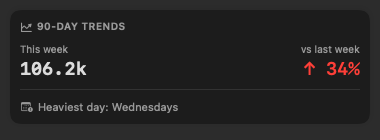
See your cognitive load across the last three months. Spot patterns — your heaviest days, your best recovery weeks, and how your focus evolves over time. Week-over-week comparisons make it easy to notice drift before it becomes burnout.

Smart Alerts

Get notified when you cross a token threshold you set, when your cognitive temperature stays elevated for too long, or receive a calm end-of-day digest. Alerts that respect your flow — not interruptions for their own sake.

Export CSV & Markdown

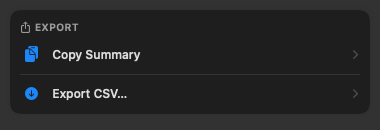
Pull your session data into any spreadsheet, pipe it into your own tools, or paste a Markdown summary into your daily notes. Your data, your format — Human Token never locks it away.

Daily Token Goal

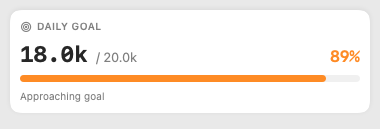
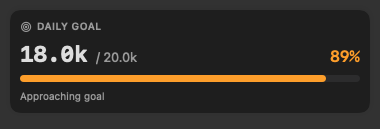
Set a personal target for your daily cognitive output and track your progress toward it in the menu bar. Useful for pacing yourself on long projects — or for days when you need a clear finish line.

Real UI

Everything lives in the popover.

Pro cards appear seamlessly below your daily summary — no separate window, no context switch.

90-Day Trends
Light 90-day trends — light
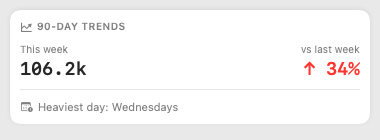
Dark 90-day trends — dark
Daily Goal
Light Daily goal — light
Dark Daily goal — dark
Smart Alerts
Threshold alert
Human Token
Baseline threshold reached
You've crossed 80% of your daily token baseline. Consider a break.
End-of-day digest
Human Token
Today's digest
18.0k weighted tokens · Deep Work mode most of the day · Heaviest hour: 14:00
Export
Light Export card — light
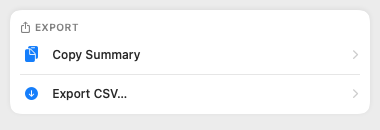
Dark Export card — dark
Free vs Pro

The free version is genuinely useful.

Pro adds depth — not access to basics.

Feature Free Pro
Core tracking
Menu bar token counter
Real-time cognitive mode detection
Idle detection & auto-pause
Today's session timeline
Hourly velocity chart
History & trends
90-day history
Week-over-week comparison
Alerts
Threshold notification
High-flux nudge
End-of-day digest
Export & goals
Export as CSV
Export as Markdown
Daily token goal & progress
$9.99

One-time. No renewal. No subscription. Ever.

Use on all your Macs
All future updates included
License key shown in-app after purchase
macOS 13 Ventura or later
Download & Buy in the App

Purchase inside the app — open Preferences (⌘,) → Pro tab → Buy Pro.

FAQ

Common questions

Purchase happens directly inside the app — open Preferences (⌘,) → Pro tab → click "Buy Pro". After checkout completes, your license key is shown immediately in the app. Copy it to activate on your other Macs.
Yes — one license works on all your Macs. Buy once, activate anywhere.
Your key is shown in the app immediately after purchase — copy it from Preferences → Pro. If you've lost it, send a message via the feedback page with your Paddle order ID and we'll sort it out.
The free version of Human Token is the trial. It has everything you need to understand how the app works and whether it fits your workflow. Pro is for when you want to go deeper.
It depends on how AI-heavy your day is. A good starting point: 3k–8k for occasional ChatGPT or Claude.ai questions; 10k–16k for regular AI-assisted writing or code review; 18k–25k for intense Claude Code or Cursor sessions. The best approach: watch your natural usage for a week in the free version, then set a goal roughly 15% above your average. That way it nudges you without feeling punishing.
Look for patterns you wouldn't notice day-to-day. If your token count drops every Thursday, you're probably in back-to-back meetings — that's calendar debt made visible. If it spikes on Sunday evenings, you're doing more catch-up work than you think. Week-over-week comparison is especially useful when you adopt a new tool: switching from GitHub Copilot to Cursor, or starting to use Claude for code review — you'll see exactly whether it changed your output or just your habits.
Set it at 70–80% of your daily goal. When the alert appears mid-afternoon, it's a signal to switch into wrap-up mode rather than starting a fresh task. Think of it as a natural Pomodoro for deep AI work — without any timers. A second useful threshold: set a lower alert at around 30% for a morning check-in. If you've already burned through a third of your goal before lunch, you know it's a dense day and can plan accordingly.
A few things people find useful: import it into Numbers or Excel to build a personal productivity dashboard; paste it into Claude and ask "what patterns do you see in my AI usage?" (very meta, surprisingly useful); for freelancers, cross-reference it with your project notes to understand AI-assisted hours per client; for engineers on a team, share a monthly snapshot with your manager to make the case for an AI tooling budget upgrade.
Yes — Claude Code is tracked specifically. Human Token checks every 30 seconds whether the Claude CLI process is running. When it is, time spent in the terminal is counted as AI Collaboration — the highest-rate activity category — rather than plain terminal work. Regular terminal sessions without Claude running accumulate tokens at a much lower rate, so the distinction is meaningful. Cursor desktop is similarly recognised as an AI tool automatically. Over time you'll see exactly how much of your coding time is human-led vs. AI-led.

Ready to see
the full picture?

$9.99 once. No subscription. Cancel nothing.

Download & Buy in the App

Free to download · Purchase via Preferences → Pro tab · 30-day refund